Manage cookies
We use cookies to provide the best site experience.
Manage cookies
Cookie Settings
Cookies necessary for the correct operation of the site are always enabled.
Other cookies are configurable.
Essential cookies
Always On. These cookies are essential so that you can use the website and use its functions. They cannot be turned off. They're set in response to requests made by you, such as setting your privacy preferences, logging in or filling in forms.
Analytics cookies
Disabled
These cookies collect information to help us understand how our Websites are being used or how effective our marketing campaigns are, or to help us customise our Websites for you. See a list of the analytics cookies we use here.
Advertising cookies
Disabled
These cookies provide advertising companies with information about your online activity to help them deliver more relevant online advertising to you or to limit how many times you see an ad. This information may be shared with other advertising companies. See a list of the advertising cookies we use here.

Case study · Legacy IP PBX

AI for 120 agents without replacing a twelve-year-old IP PBX

Replacing the company's IP PBX meant eight months of work and a budget nobody wanted to sign. Instead, Incoplax connected AI Softphone to the old PBX over SIP. Agents got speech recognition, call analysis in Prompt Studio and a real-time prompter in three weeks, and the PBX kept running exactly as before.

Client
B2B software and services company, sales and support desk in two offices. Name withheld under NDA
Kept
An IP PBX installed in 2013, out of vendor support: queues, IVR, trunks and dial plan untouched
Added
AI Softphone on all 120 agent desks: live prompter, transcription and Prompt Studio
Connection
Standard SIP: each softphone registers on the PBX as an ordinary extension
Rollout
3 weeks from the first test call to every desk
  • 3 weeksto give every agent AI, against 8 months for a new PBX
  • 0changes to queues, IVR or trunks
  • −72%after-call work, from 2:40 to 0:45 per call
  • 100%of calls transcribed and written up

Replace the PBX, or build on it?

The PBX still carried every call reliably. What it could not do was help the people on the phone. The vendor had stopped developing it years ago, and the replacement quote came with an eight-month plan.

Replace the IP PBX

Time8 months
Budget100
  • New platform, licences and handsets for every desk
  • Queues, IVR and dial plan rebuilt and retested
  • SIP trunks and numbers moved, with a cutover weekend
  • Every agent and supervisor retrained

Add AI Softphone over SIP

Time3 weeks
Budget7
  • One SIP extension per agent on the existing PBX
  • A speech server and a language model server in the server room
  • Headsets, and the softphone installed with the usual software rollout
  • One hour of training per agent

Budget is indexed: the replacement quote = 100. AI Softphone itself is free software under GPL v2; the 7 covers servers, headsets and project work.

What the agents were missing

No text of any call

Recordings existed only for disputes. Nobody could search what customers actually said.

Notes typed by hand

Agents spent 2 minutes 40 seconds after every call writing a summary into the CRM, and follow-ups got lost.

Quality checked on 2% of calls

Two team leads listened to a handful of recordings a week. Most problems surfaced as complaints.

New agents alone on the line

It took eight weeks before a new agent could handle pricing and technical questions without help.

How AI Softphone plugs into an old IP PBX

To the PBX, AI Softphone is one more SIP phone. It registers as an extension, receives calls from the same queues and sends audio the same way a desk phone does. Everything new happens on the agent's computer and on two servers the company already controls.

Audio, transcripts and write-ups never leave the company network: the PBX, the softphones and both servers sit on the same LAN.

One call, message by message

AI SoftphoneLegacy IP PBX
  1. REGISTERextension 204 signs in
  2. 200 OKregistered
  3. INVITEa call from the support queue
  4. 180 Ringingthe CRM card opens via webhook
  5. 200 OKthe agent answers
  6. RTP audiorecorded on two channels, streamed to the prompter
  7. BYEcall ends; the write-up starts
Plain SIP and RTP, the same messages the PBX already exchanges with its desk phones.

Four steps per desk

  1. Create the extensionOn the PBX: one SIP extension per agent, the same way an IP desk phone is added.
  2. Sign the softphone inUsername, password and the PBX address. UDP on port 5060 by default.
  3. Point it at your serversSpeech recognition and the language model, both on servers inside the company.
  4. Choose what runsPrompter assistants for live calls and Prompt Studio rules for after them.

On the PBX, the whole project was 120 new SIP extensions. Spare SIP licences covered them, so the only change request was the one that created them.
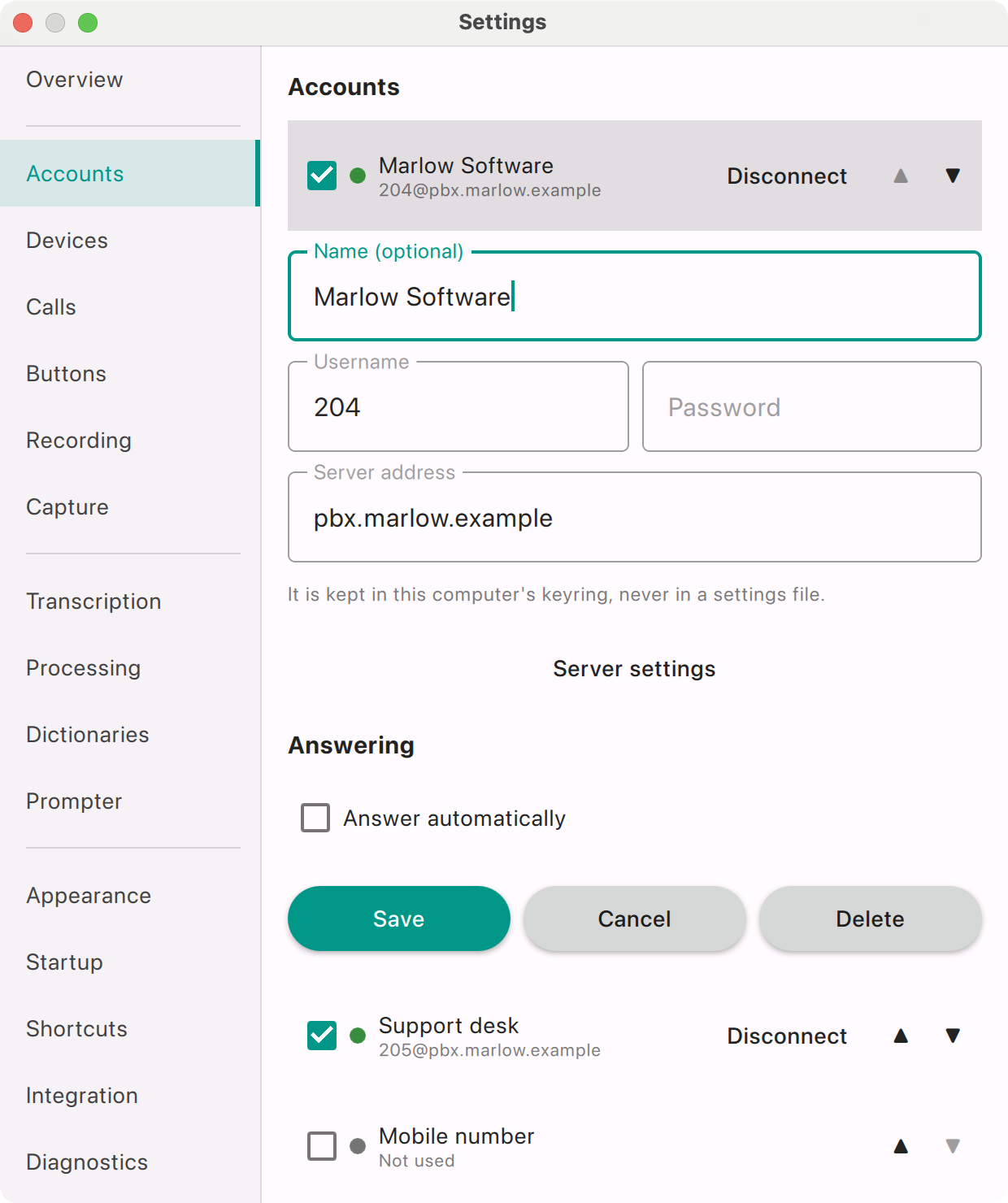
AI Softphone account settings: username 204, password and server address of the PBX, with two registered accounts

The whole connection: an extension number, its password and the PBX address.
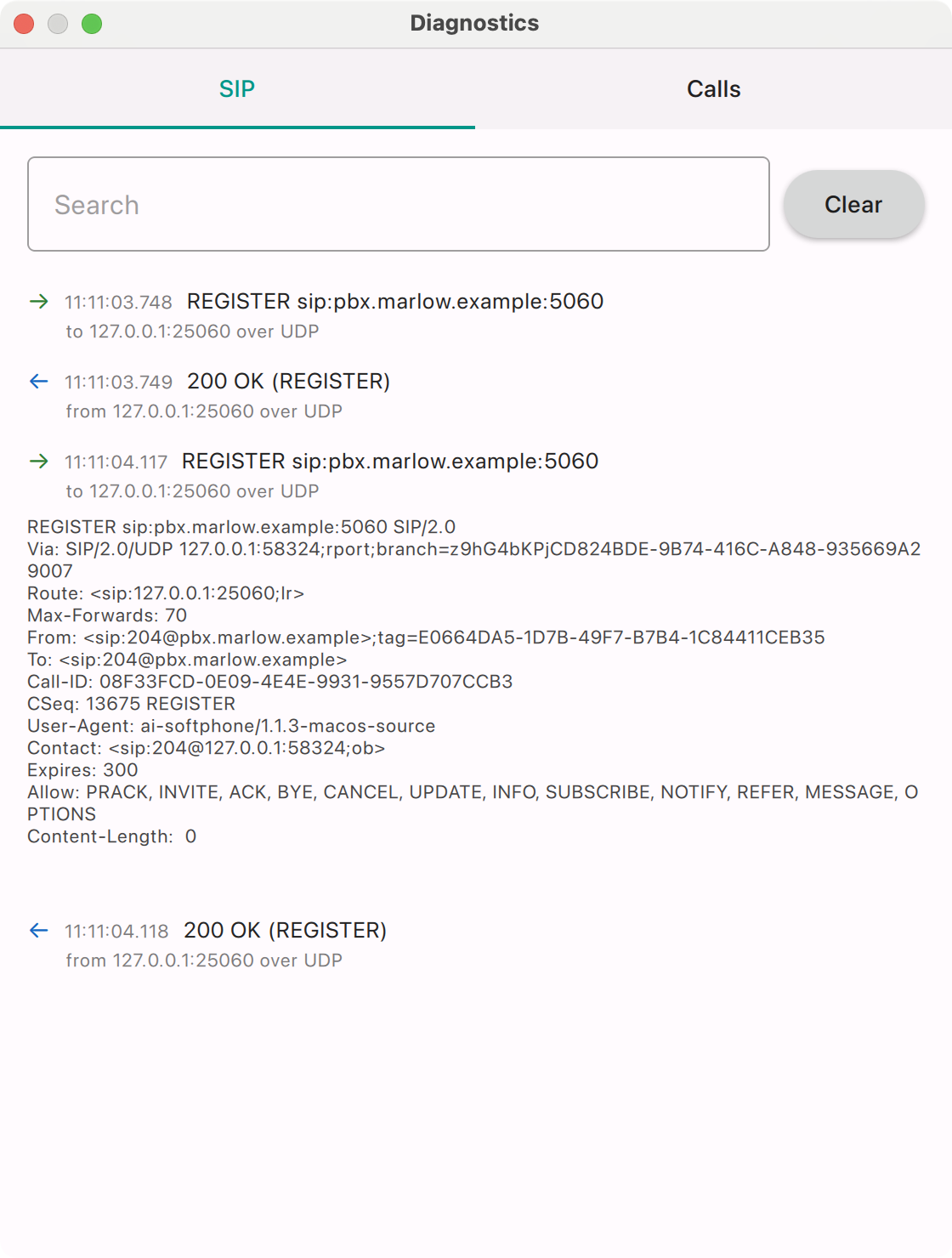
AI Softphone diagnostics window listing SIP REGISTER requests and 200 OK answers from the PBX over UDP

Diagnostics shows every SIP message between the softphone and the PBX, which made the first test call a five-minute job.

A prompter that listens with the agent

During the call the prompter writes down both sides as they speak and, beside each customer reply, suggests what to say next. It follows instructions the company wrote itself, so the suggestions use its prices, its products and its rules.
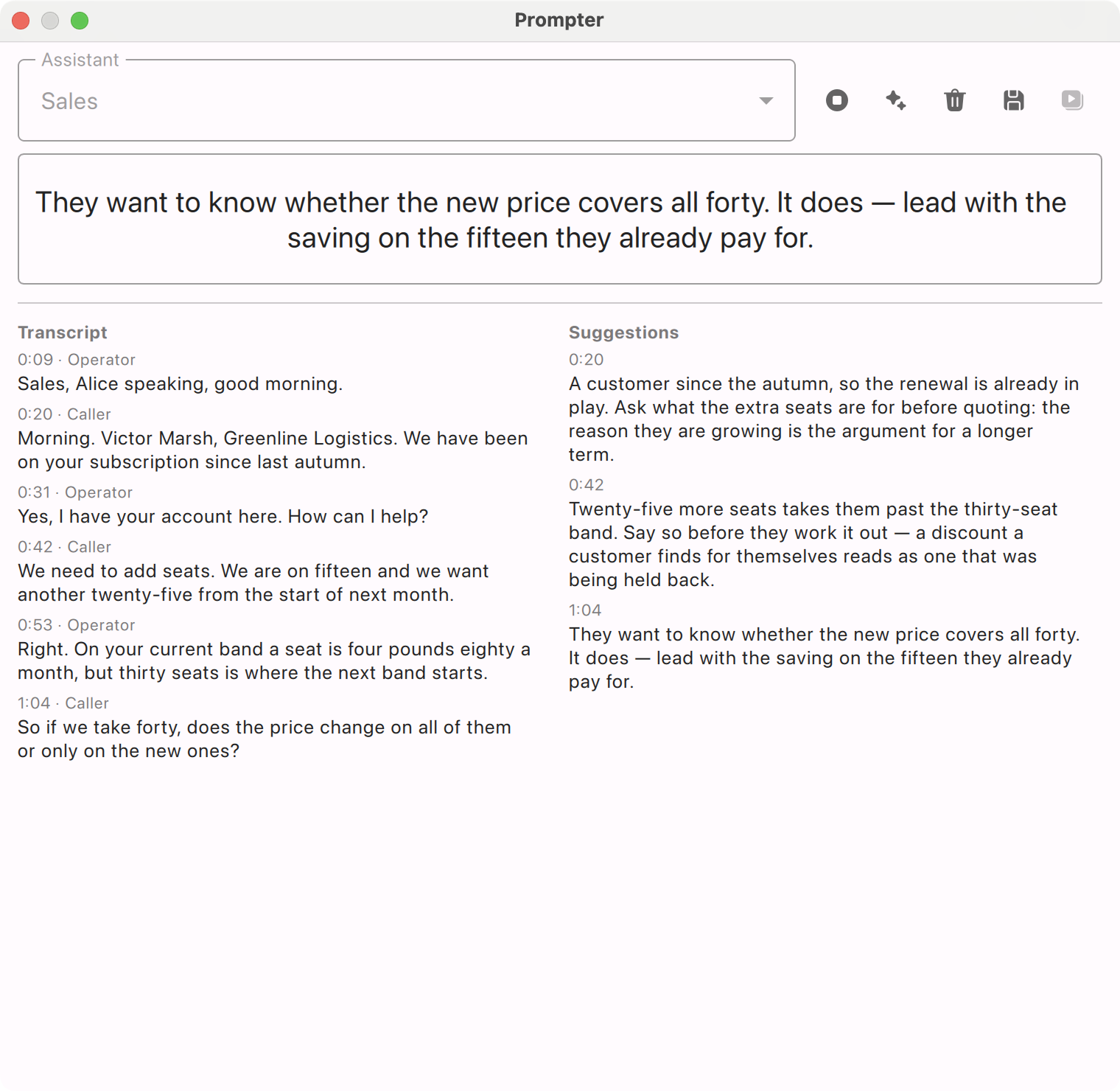
AI Softphone prompter during a sales call: the transcript on the left, suggestions on the right and the newest suggestion in large type

The sales assistant: what the customer just asked, and how to answer it.
  • 4 weeksfor a new agent to work alone, down from 8
  • −28%calls escalated to a team lead
  • Sales objections: the built-in assistant, reworded with the company's price bands, discount rules and approved wording
  • Support helper: a new assistant whose instructions list the known issues of each product and the questions to ask first
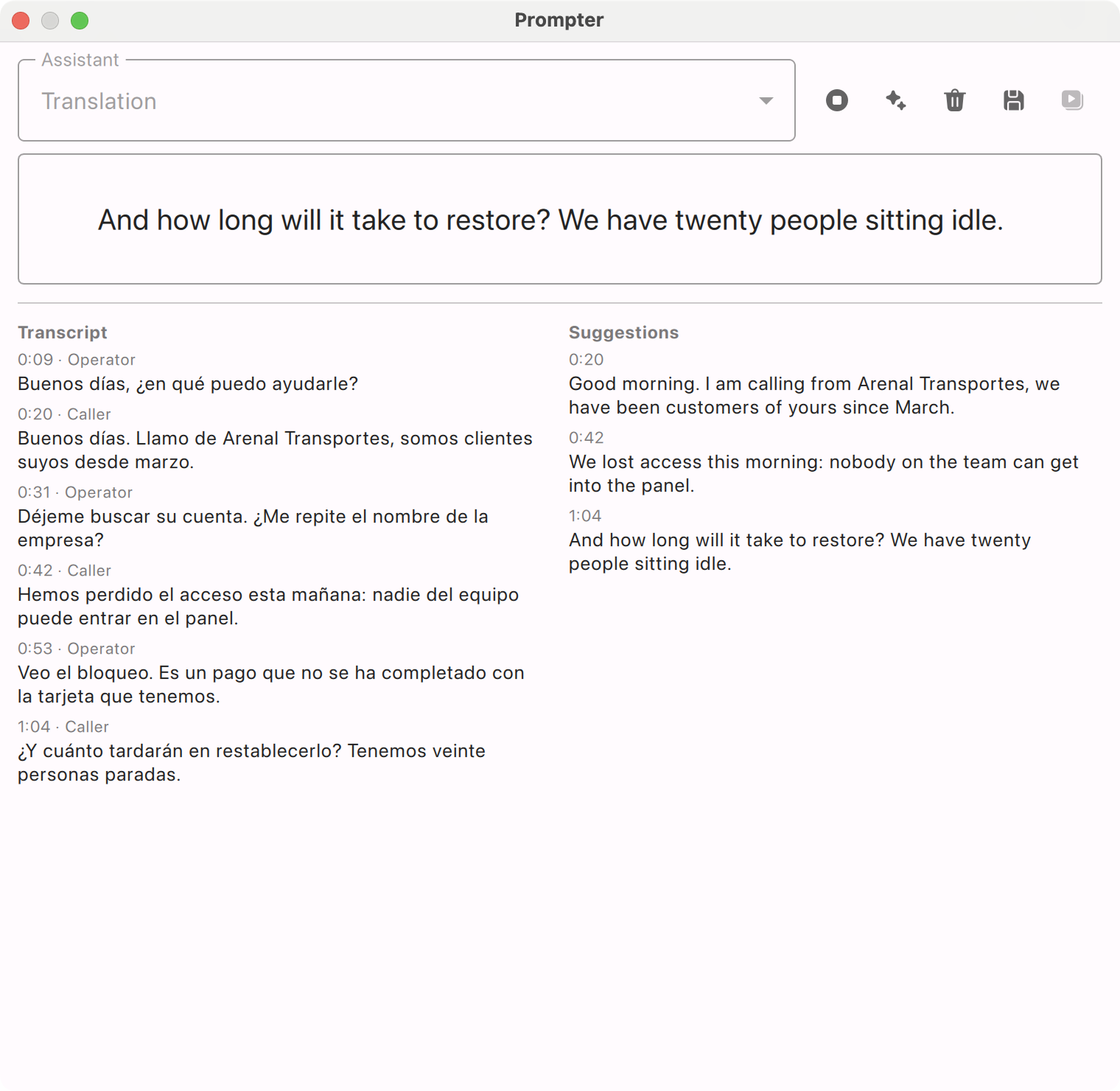
  • Translation for customers abroad: the other side translated line by line while they are still talking
  • Rehearsed on real recordings before go-live, so every assistant was tuned without ringing a single customer
  • Monthly spending ceilings for recognition and the model, so the prompter cannot surprise the budget
  • Consent first: the prompter starts only after the call announcement has been played

Screenshots of AI Softphone with demo data.

Every call becomes searchable text

The softphone records each call on two channels, the agent on one and the customer on the other, so the transcript always knows who said what. Recognition runs on the company's own Whisper server, and a year of calls can be searched by what was said in them.
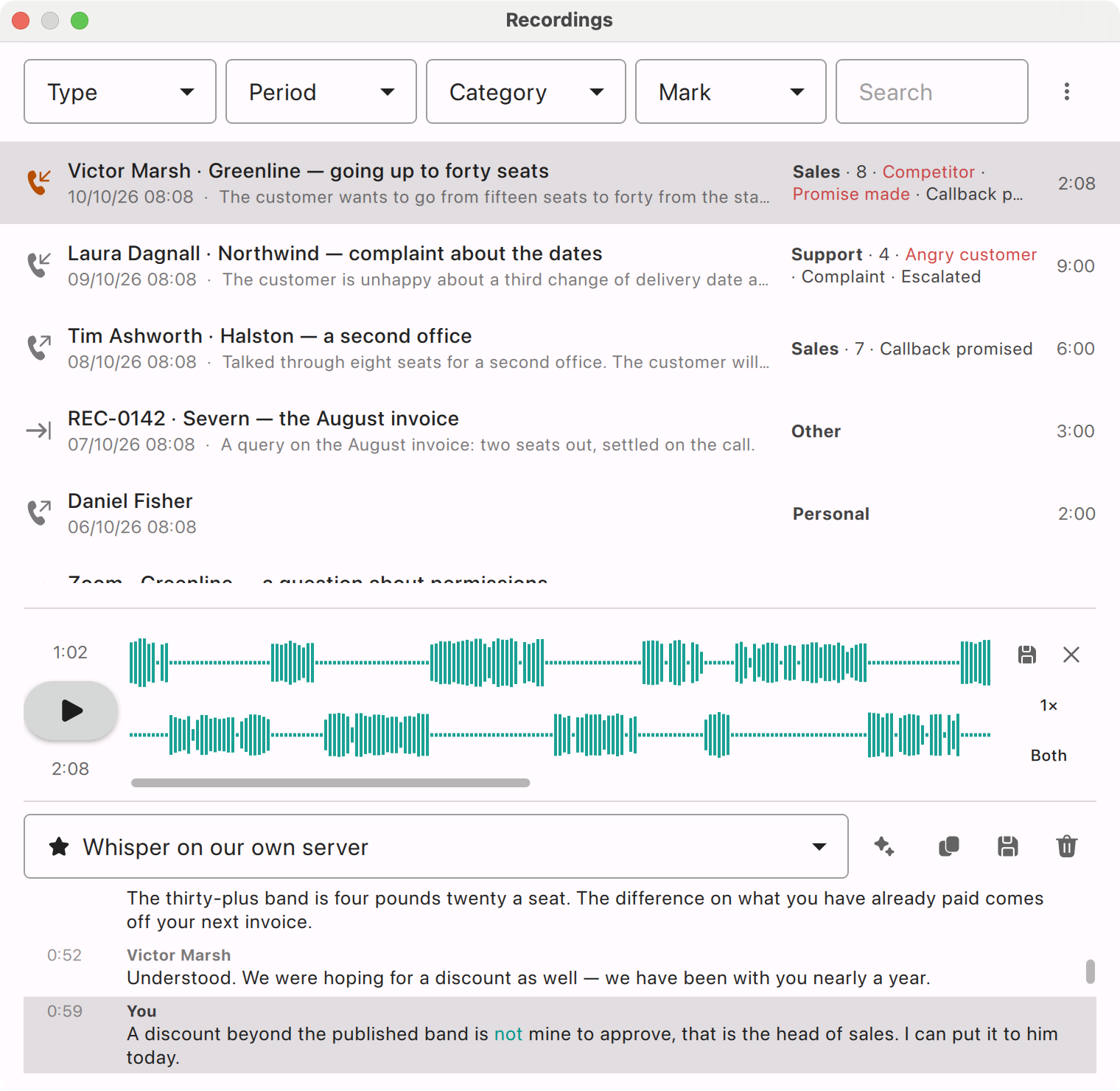
  • Click any line and hear it: the transcript stays in step with the audio
  • Any language the call was in, with the interface in the agent's own
  • Calls from other tools too: Teams and Zoom meetings with customers, and recordings dropped in from elsewhere, land in the same library
  • Retention rules clear old recordings automatically, and deleting a call deletes everything made from it
  • Export as plain text or subtitles when a dispute needs the exact words
  • 100%of calls transcribed, from none
  • 0minutes of audio sent outside the company
AI Softphone recordings window: the list of calls with summaries and categories, a two-channel waveform and the transcript from a Whisper server, speaker by speaker

Two channels, a transcript from “Whisper on our own server”, and the line being played lit up. Demo data.

Call analysis written in Prompt Studio

When a call ends, the softphone runs a chain of prompts over the transcript. The company started from the eleven built-in prompts, reworded them in plain language and added three of its own. A model on its own server does the work, so no conversation is sent to an outside AI service.

  1. 1TranscribeWhisper turns both channels into textalways
  2. 2SummariseSummary, one-line title, action items with owner and datealways
  3. 3OrganiseCategory, tags and red flags from the company's own dictionariesalways
  4. 4ReviewSales review or support review against the company's criteriaby category

Prompts the company wrote

Renewal risk

Flags a customer who mentions a competitor, a budget cut or a cancellation, with the quote that shows it.

Quote handover

Seats, term, discount asked for and the next agreed contact, ready to paste into the CRM.

Support resolution

Was the problem understood, was it solved on the call, and what was promised if not.
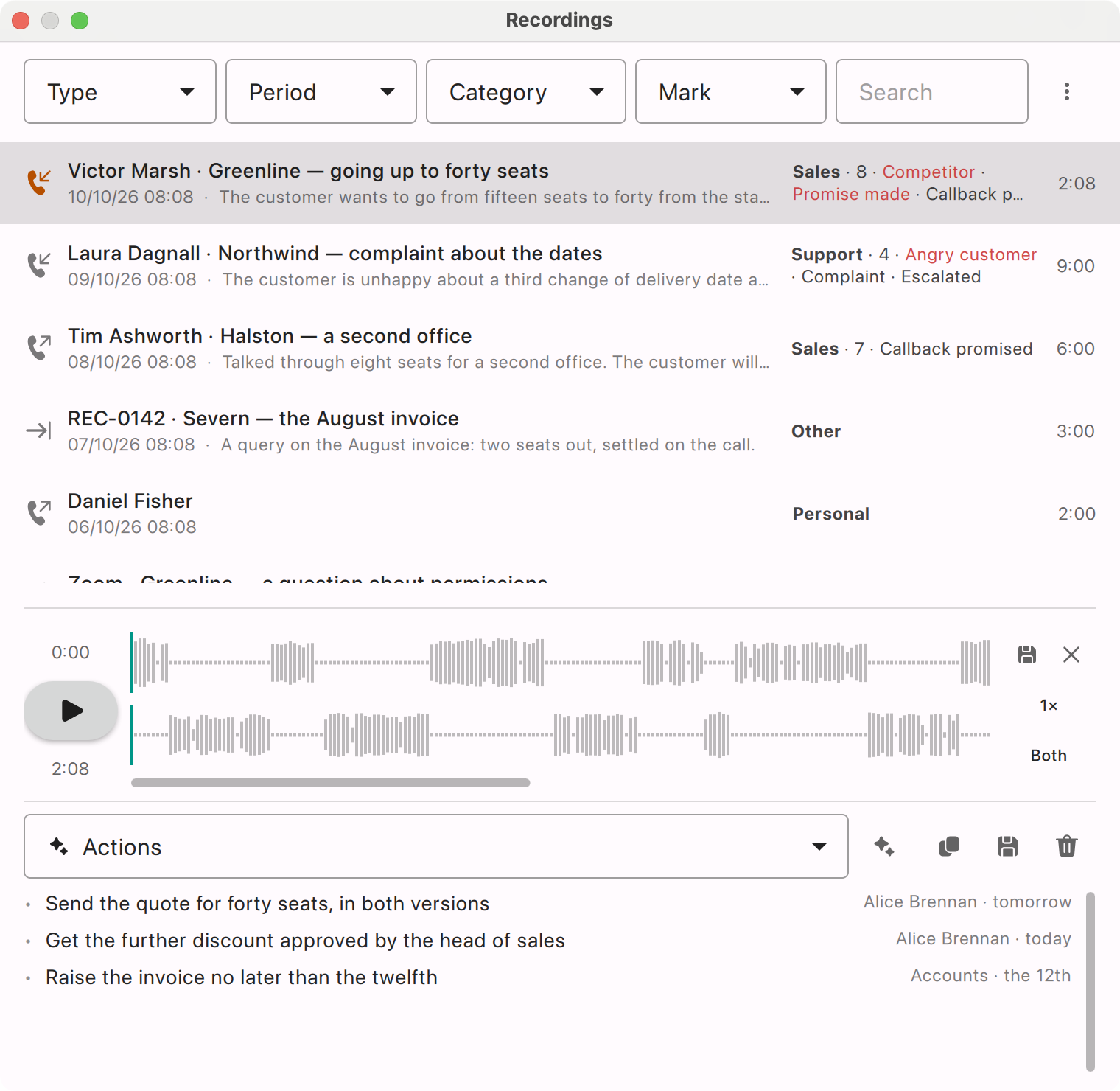
  • 0:45after-call work, down from 2:40
  • 92%of agreed follow-ups done on time, up from 61%
  • 100%of sales and support calls reviewed, up from 2%
AI Softphone recordings window with action items for a call: each task with an owner and a date, under its category and score

Action items with an owner and a date, filed under the call's category and score.
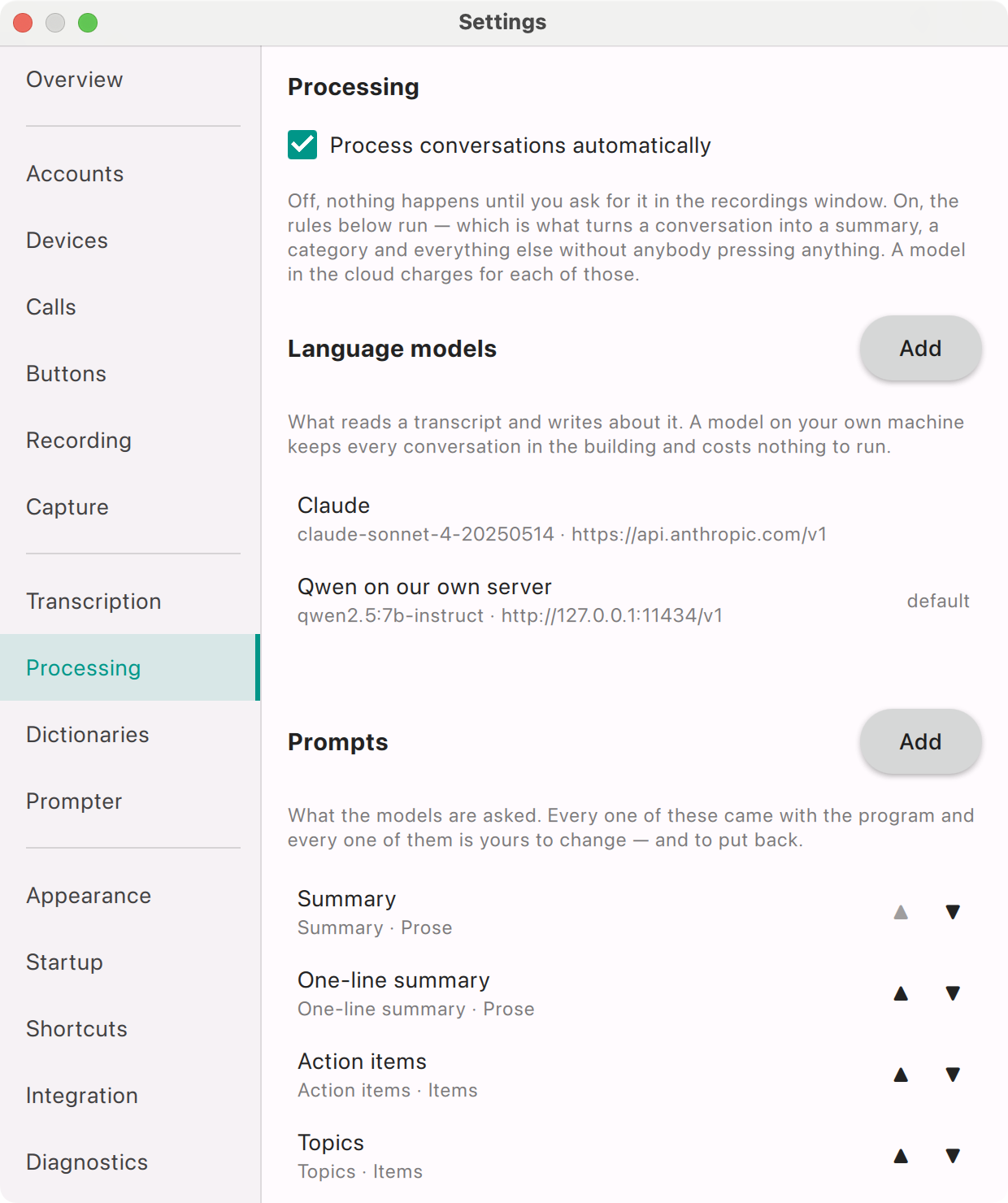
AI Softphone processing settings: automatic processing switched on, a language model on the company's own server set as default, and the list of prompts

Processing settings: a model on the company's own server as the default.

Screenshots of AI Softphone with demo data.

Results

The company compared the quarter before the rollout with the second full month after it, across all 120 agents.

MetricBeforeAfterChange
After-call work per call2:400:45−72%
Average handle time7:506:40−15%
Support issues solved on the first call68%77%+9 pts
Agreed follow-ups done on time61%92%+31 pts
Calls reviewed for quality2%100%all calls
Calls escalated to a team lead10072−28%
Weeks until a new agent works alone84−4 weeks
Changes to queues, IVR and trunks—0none

Escalations are indexed: before = 100.

“We had accepted that AI meant replacing the phone system first. It turned out the phone system only had to do what it already did: ring a SIP extension. Three weeks later every agent had a transcript, a summary and a prompter, and our PBX budget went back into the drawer.”

Head of Customer Operations · name withheld under NDA

Three weeks, desk by desk

Nothing had to be switched over on a weekend. Each agent kept a working phone the whole time, and the PBX never noticed more than new extensions signing in.

  1. Test callDays 1–2

    One SIP extension, one laptop, a call from the support queue answered and recorded on the first afternoon.

  2. ServersDays 2–5

    Whisper and an open-weight model installed on two servers in the server room, both reachable only from the office LAN.

  3. Pilot desksDays 4–7

    Ten agents from sales and support on AI Softphone, their desk phones left in place as a fallback.

  4. Prompts and assistantsDays 6–10

    Prompts reworded and three new ones written, assistants rehearsed on the pilot's own recordings.

  5. All desksDays 11–15

    Extensions created in bulk, the softphone pushed with the usual software rollout, 120 agents trained in one-hour sessions.

What made it work

SIP is the integration

Any IP PBX that can add an IP phone can add AI Softphone. No connector, no API on the PBX side, no vendor involved.

Keep the AI in the building

Recognition and the model run on the company's own servers, which settled the security review in one meeting.

Prompts are business documents

Team leads, not engineers, wrote and reworded the prompts. Changing what the AI looks for takes minutes.

Replace the PBX when it suits you

The softphones work with any SIP platform, so the AI layer moves unchanged when the PBX is eventually replaced.